

Steps to optimize a Database via phpMyAdmin in cPanel
-
Log in to your cPanel account.
-
In the Databases section, click on phpMyAdmin.

-
Click on the Expand icon from the navigation tree in the left sidebar.

-
Scroll down and mark Check All. Click on the drop-down option and select Optimize tables.
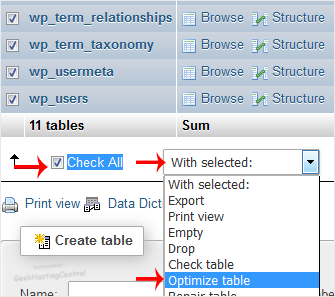
The table has been successfully optimized.
