Steps to check for New Email in Outlook 2021
-
Open Outlook 2021.

-
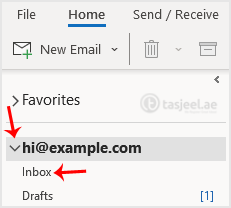
In the left panel. You can see a list of your email accounts, double-click on it to expand.
-
Click on Inbox, and it will start syncing.

Open Outlook 2021.
In the left panel. You can see a list of your email accounts, double-click on it to expand.
Click on Inbox, and it will start syncing.
If your question isn't covered in our knowledge base, feel free to open a support ticket or send us a message. Our team will be happy to help.