

How to forward an email?
Steps to forward an Email to Gmail or Other Email Service Providers
-
Log in to your cPanel account.
-
In the Email section, click on Forwarders and then click on Add Forwarder.

-
Enter the following details:
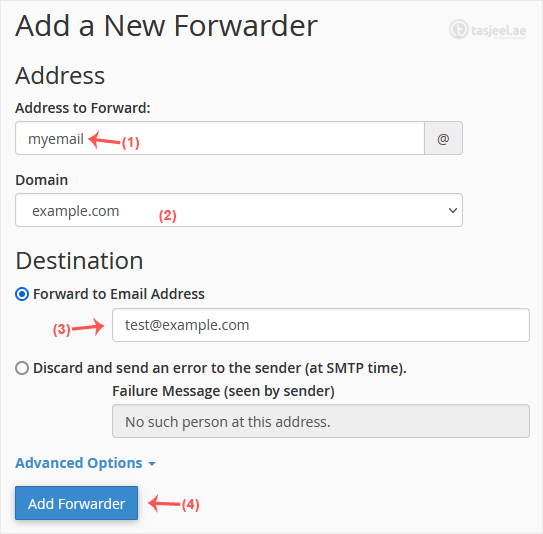
- Address to Forward: Enter the email address you want to forward. If you’re going to forward your [email protected] to a custom e-mail address, enter myemail in this field.
- Domain: Select the appropriate domain from the Domain drop-down list if you have multiple domains.
- In the Destination section, select Forward to email address and enter your e-mail address on which you want to receive forwarded emails.
-
Click on Add Forwarder.
How to forward an email to a mail pipe script/program?
Additional steps for steps to forward an email to gmail or other email service providers
-
In the Email section, click on Forwarders and then choose Add Forwarder.
-
Enter the following details:
- Address to Forward: Enter the email address you want to forward.
- Domain: Select the appropriate domain from the Domain drop-down list if you have multiple domains.
-
In the Destination section, click on Advanced Options, select Pipe to a Program and enter the full path of your pipe script, such as
home/username/public_html/myemailpipe.php. You may have noticed that we do not use a slash at the beginning of the URL.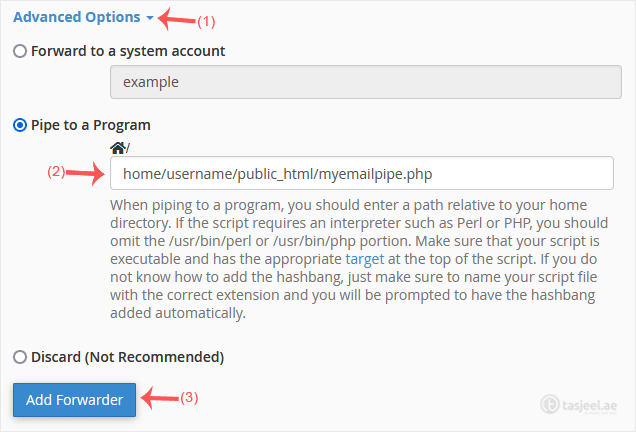
-
Click on Add Forwarder.
