Steps to create a Database in cPanel
-
Log in to your cPanel account.
-
In the Databases section, click on MySQL Databases.

-
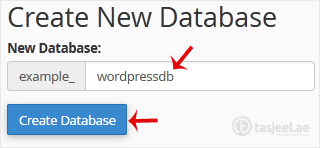
In the New Database field, enter a name for the new database you wish to create.
-
Click on Create Database.


Log in to your cPanel account.
In the Databases section, click on MySQL Databases.
In the New Database field, enter a name for the new database you wish to create.
Click on Create Database.
If your question isn't covered in our knowledge base, feel free to open a support ticket or send us a message. Our team will be happy to help.