How to Delete a Database in cPanel

Steps to delete a Database in cPanel

  1. Log in to your cPanel account.

  2. In the Databases section, click on MySQL Databases.

    In the Databases section, click on MySQL Databases .
  3. Under Current Databases, you can see a list of all your databases. Locate the database you want to remove and click on Delete.
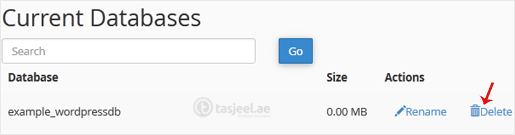
    Under Current Databases , you can see a list of all your databases. Locate the database you want to remove and click on Delete .
  4. Click on Delete Database.

    Click on Delete Database .

Didn't find the answer you were looking for?

If your question isn't covered in our knowledge base, feel free to open a support ticket or send us a message. Our team will be happy to help.

Media countianer (6)