

Steps to delete a Database Table via phpMyAdmin in cPanel
-
Log in to your cPanel account.
-
In the Databases section, click on phpMyAdmin.

-
Click on the Expand icon from the navigation tree in the left sidebar.

-
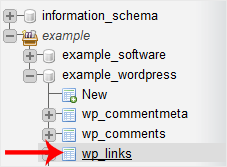
Select the appropriate table you want to delete. If you’re going to delete table “wp_links”, choose it.
-
Now click on Operations.

-
Scroll down and then click on Delete the table (DROP).
Warning: The whole table will be removed. Please, note that it will be impossible to restore it, especially if you don’t have a backup.
