
How to Change the Language of Your cPanel Account

cPanel supports many languages. If you want to change your cPanel language to a native one, you should follow this tutorial.

Steps to change the Language of Your cPanel Account

  1. Log in to your cPanel account.

  2. In the Preferences section, click on Change Language.

    In the Preferences section, click on Change Language .
  3. Select the appropriate language from the drop-down menu and click on Change.
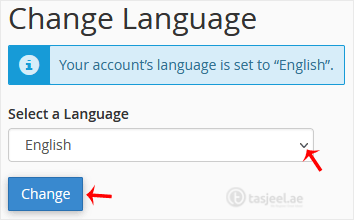
    Select the appropriate language from the drop-down menu and click on Change . The language in your cPanel has been successfully changed.

    The language in your cPanel has been successfully changed.

Didn't find the answer you were looking for?

If your question isn't covered in our knowledge base, feel free to open a support ticket or send us a message. Our team will be happy to help.

Media countianer (6)