
How to Forward Email in Outlook 2021

You can forward the email using Outlook 2021.

Steps to forward Email in Outlook 2021

  1. Open Outlook 2021.

    Open Outlook 2021.
  2. Go to Inbox, right-click on the message you want to forward and click on Forward.
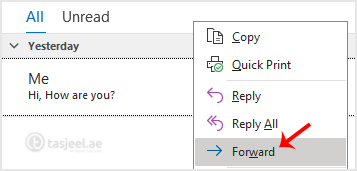
    Go to Inbox, right-click on the message you want to forward and click on Forward .
  3. Enter the email address of the person you want to forward the email to in the To field. Type your message in the message box and click Send.
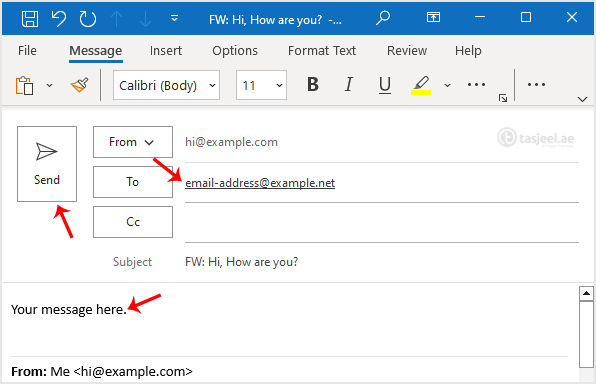

    Enter the email address of the person you want to forward the email to in the To field. Type your message in the message box and click Send .

Didn't find the answer you were looking for?

If your question isn't covered in our knowledge base, feel free to open a support ticket or send us a message. Our team will be happy to help.

Media countianer (6)