You can use the cPanel’s login details to access your Web Disk. You can also create an additional account for accessing a specific directory on your account.
Steps to create an Additional Web Disk Account in cPanel
-
Log in to your cPanel account.
-
In the Files section, click on Web Disk.

-
Under Create an Additional Web Disk Account, enter the details of the new account you wish to create.Username: Enter a username such as folderx.
Password: Enter your new password or click on Password Generator to generate a random password.
Directory: You can leave it blank, but it will allow access to the whole directory. Enter the directory location, such as public_html/folderx. The user will only have access to the directory path /folderx.
Permissions: Select your option.
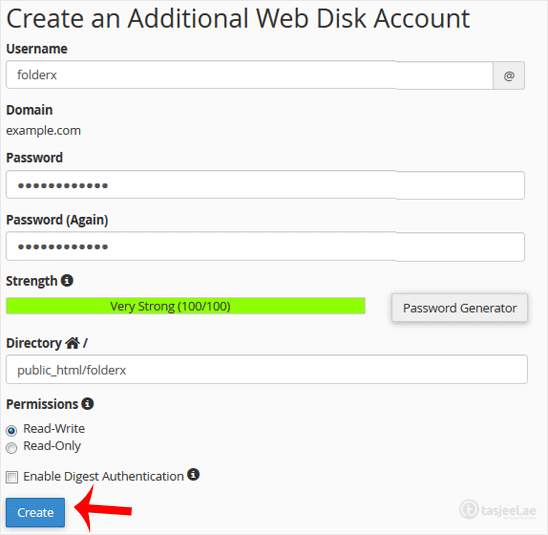
Note: If you use the Windows OS, mark Enable Digest Authentication. However, if the server has an SSL certificate signed by a recognized certificate authority and you can make an SSL connection over port 2078, you do not need to enable this.
-
Now click on Create. You can use the new login details to access your Web Disk account.