
Forgotten an email password, or want to change it? You set a new one in cPanel. Nobody can see the old one, not even us, so the fix is always a new password.
Set a new email password
- Open Email Accounts
Log in to cPanel, then go to Email › Email Accounts. You can also click Email Accounts under Quick Shortcuts on your hosting plan’s page in the client area.
- Click Manage
Find the email address in the list and click Manage on its row.
- Type the new password
Under Security, type the new password in New Password, or click Generate for a strong one.
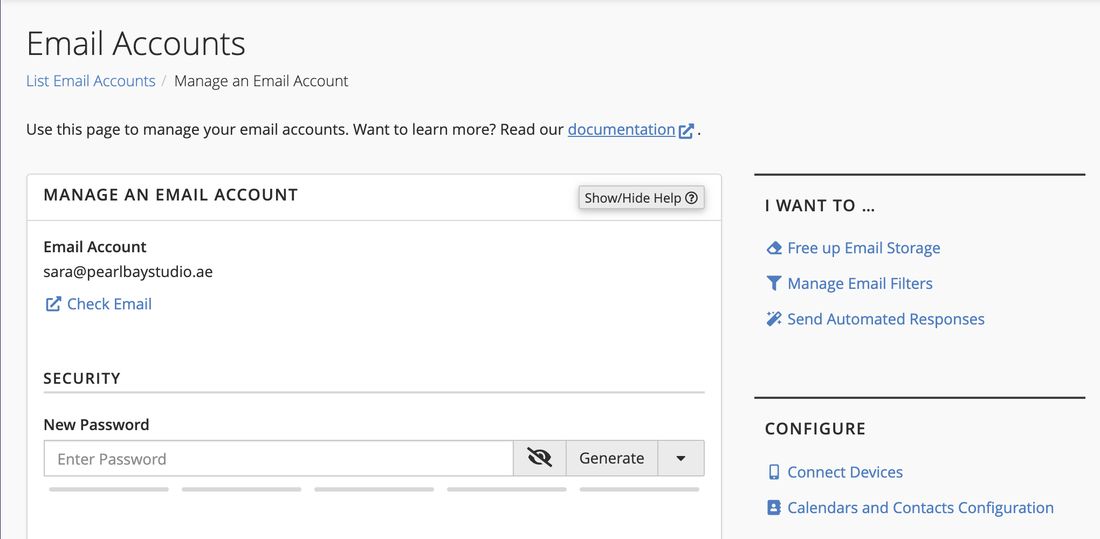
Manage an Email Account, with New Password under Security - Save
Scroll down and click Update Email Settings. The new password works straight away.
Each phone, computer and email app that uses this address still has the old password saved. Change it in each one, or they’ll keep asking for it and may stop getting email. See Email settings: server names and ports.
Your client area, cPanel and each mailbox have separate passwords. Changing an email password doesn’t change the others.
Common questions
I can’t log in to cPanel either.
Log in to your client area at my.tasjeel.ae and use the one-click Log in to cPanel button. You don’t need a cPanel password for that. See Log in to cPanel and find your username.
My email was blocked for sending spam.
Someone has probably got hold of the password. Set a new, strong password using the steps above, scan your computer with antivirus software, then tell us by ticket or chat and we’ll unblock it.
Someone else manages our email.
Ask them, or whoever has access to the client area, to set a new password for you. For your security we can’t give out passwords.
I changed it, but my phone still says the password is wrong.
Delete the saved password in the app and type the new one. If it still fails, remove the account and add it again.