
Every hosting plan has a disk space limit and a limit on the number of files. If you reach either one, email can stop arriving and your website can show errors.
See how much you’re using
Log in to cPanel and look at Statistics on the right. Disk Usage shows how much space you’re using out of your plan’s limit, for example 349 MB / 10 GB.
File limit: hosting plans can hold up to 75,000 files, and Ultimate hosting up to 200,000. Every email counts as a file. cPanel doesn’t show your file count, so contact us and we’ll tell you how many you have.
Find what’s taking up the space
- Open Disk Usage
Log in to cPanel, then go to Files › Disk Usage.
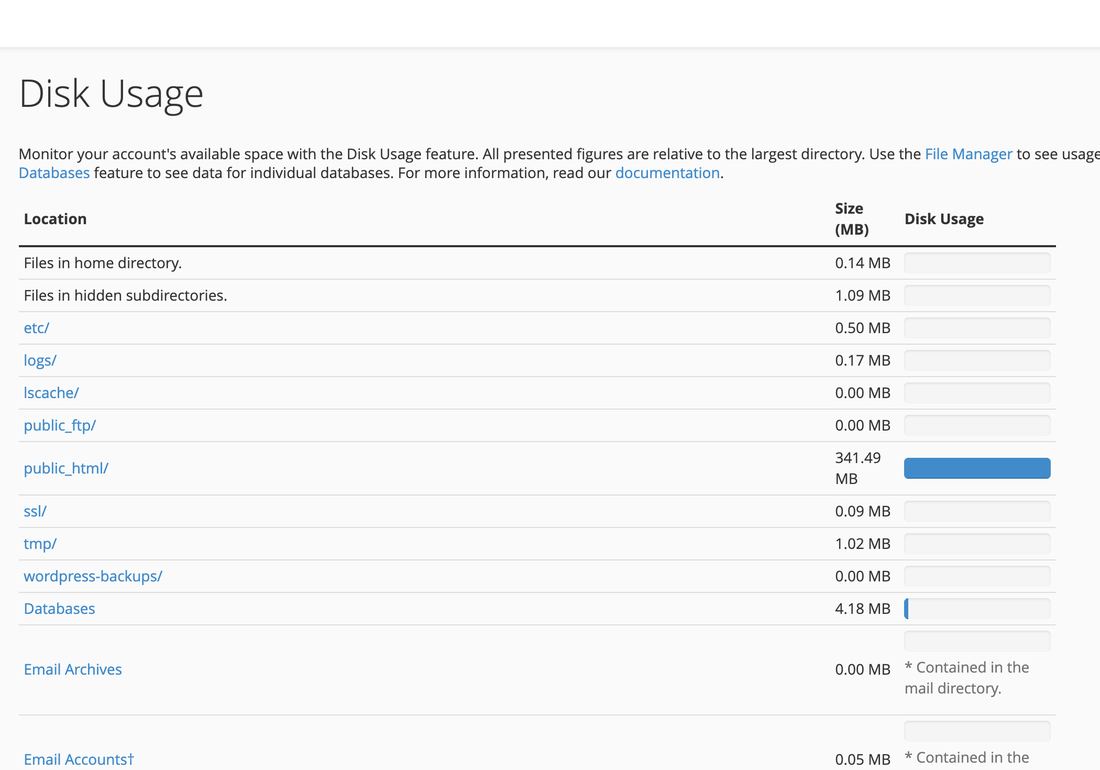
Disk Usage in cPanel, folder by folder - Look for the biggest folders
public_htmlis your website.mailis your email. Backup folders and old copies of your site are often the surprise. - Check your email too
Email is often the biggest user. Email › Email Disk Usage shows each mailbox and lets you delete old messages. See My mailbox is full.
If you’re running out
Clear out
Delete old backups, unused copies of your site, files you no longer need and old email. Download anything you want to keep first.
Upgrade your plan
On your hosting plan’s page in the client area, click Upgrade/Downgrade and choose a bigger plan. You only pay the difference for the rest of your billing period.
Thousands of small files, such as cache files or old email, can hit the file limit long before the space runs out. Clearing caches and old email usually fixes it.