
A cron job runs a command or script on a schedule, such as a nightly clean-up or a website task every hour. Most websites don’t need one, so only add one if your developer or plugin asks for it.
Add a cron job
- Open Cron Jobs
Log in to cPanel, then go to Advanced › Cron Jobs.
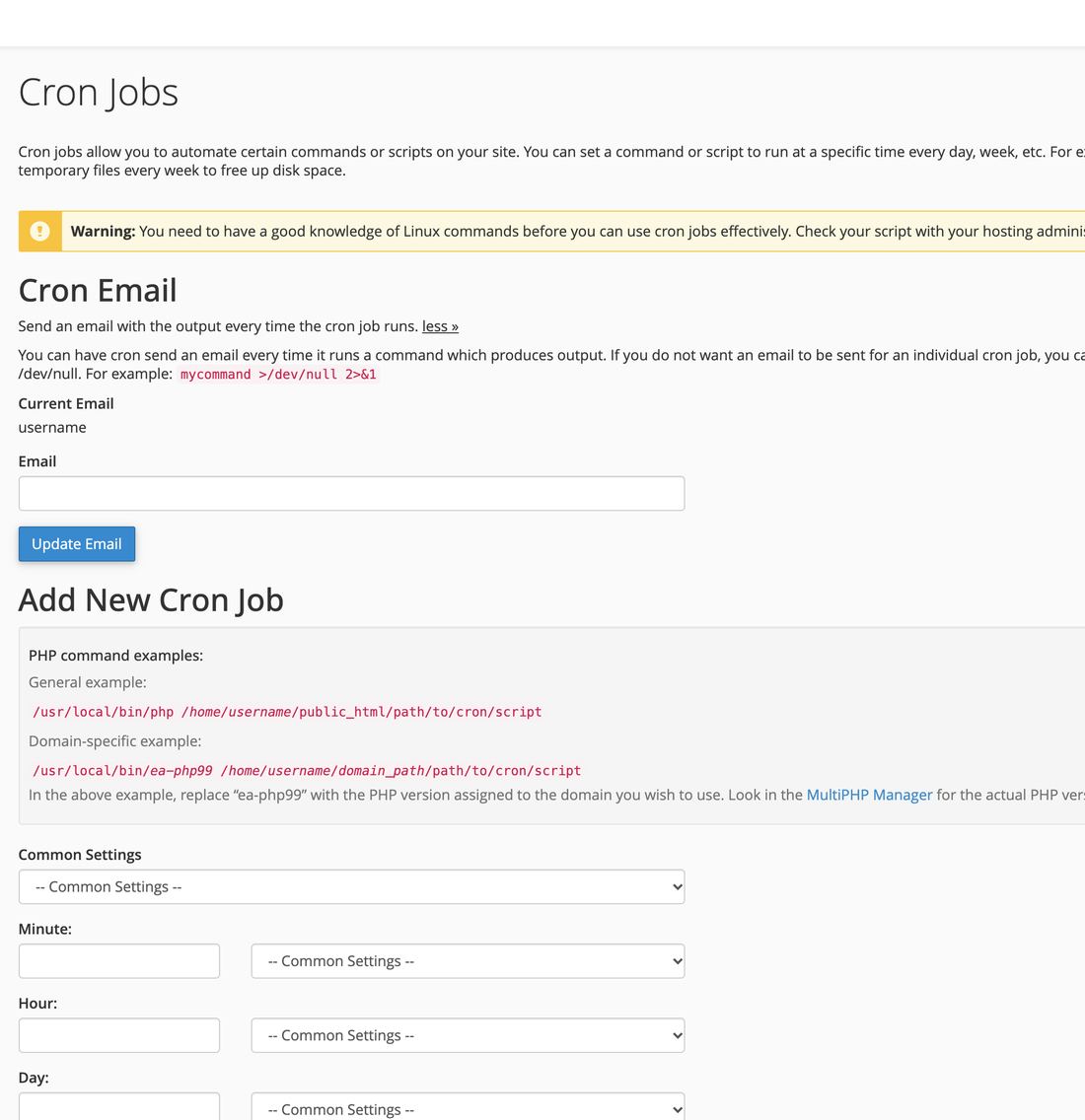
Cron Jobs in cPanel - Choose how often
Pick a schedule from Common Settings, such as Once Per Hour or Once Per Day. The minute, hour and day boxes fill in for you.
- Type the command
Paste the command your developer or plugin gave you. For a PHP script it usually looks like
/usr/local/bin/php /home/username/public_html/script.php, with your own cPanel username. - Add
Click Add New Cron Job. It appears under Current Cron Jobs, where you can edit or delete it.
Jobs can run as often as once a minute, but a job that runs every minute uses your plan’s processing power all day. Once an hour or once a day is enough for most tasks.
Common questions
I’m getting an email every time it runs.
Under Cron Email, clear the address. Or add >/dev/null 2>&1 to the end of the command to stop emails for that job only.
My cron job doesn’t seem to run.
Check the path in the command matches your cPanel username and the file’s real location. Set the Cron Email address to your own email for a day to see any error it reports.