
You can renew a domain any time, not just when the invoice arrives. Renewing early adds the time on top of your current expiry date, so you lose nothing.
Renew from the client area
- Open My Domains
Log in to your client area and go to Domains › My Domains.
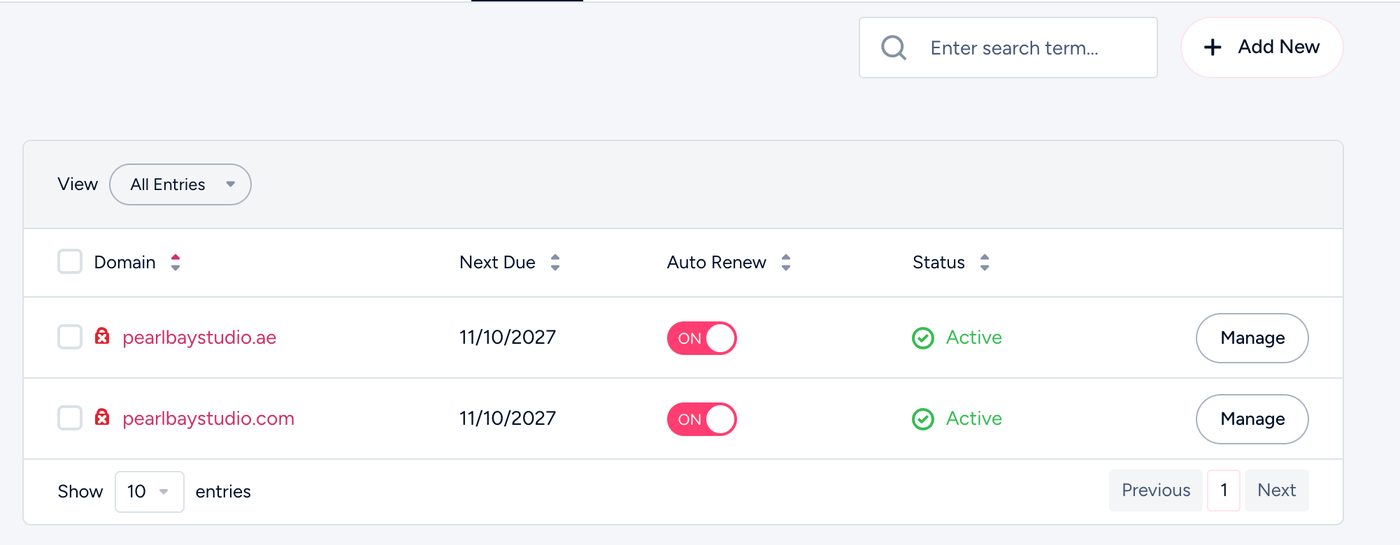
My Domains in the client area - Choose the domain
Click the domain, then Renew. Or tick several domains and renew them together.
- Pick how long
Choose the number of years and add it to your cart.
- Pay
Check out and pay. Your new expiry date shows once payment goes through.
Just pay it early. That renews the domain straight away, from its current expiry date.
Common questions
Do I lose the time I have left?
No. The new years are added to your current expiry date.
Can I renew for several years?
Yes. Choose the number of years when you renew. Each extension has a limit on how far ahead a domain can be paid for, counting the time it already has left: .ae domains up to 5 years, .com domains up to 10 years. Other extensions have their own limits, and the renewal page only offers the years that are allowed.
Will auto-renew still charge me?
No. Once you’ve renewed, there’s nothing due until the new expiry date comes round.