
Everything at Tasjeel.ae renews automatically by default, so nothing stops by accident. Here’s how to switch it off for a domain, and how to stop hosting, email and other services renewing.
Domains: two ways to switch it
From your list of domains (quickest)
- Open My Domains
Log in to your client area at my.tasjeel.ae. In the top menu, click Domains › My Domains.
- Use the Auto Renew switch
Each domain has its own Auto Renew switch in the list. Click it to turn it on or off. It saves straight away.

The Auto Renew switch for each domain in My Domains
From the domain’s own page
- Open the domain
In My Domains, click Manage next to the domain.
- Click Auto Renew
In the menu on the left, under Manage, click Auto Renew and use the Auto Renewal Status switch.
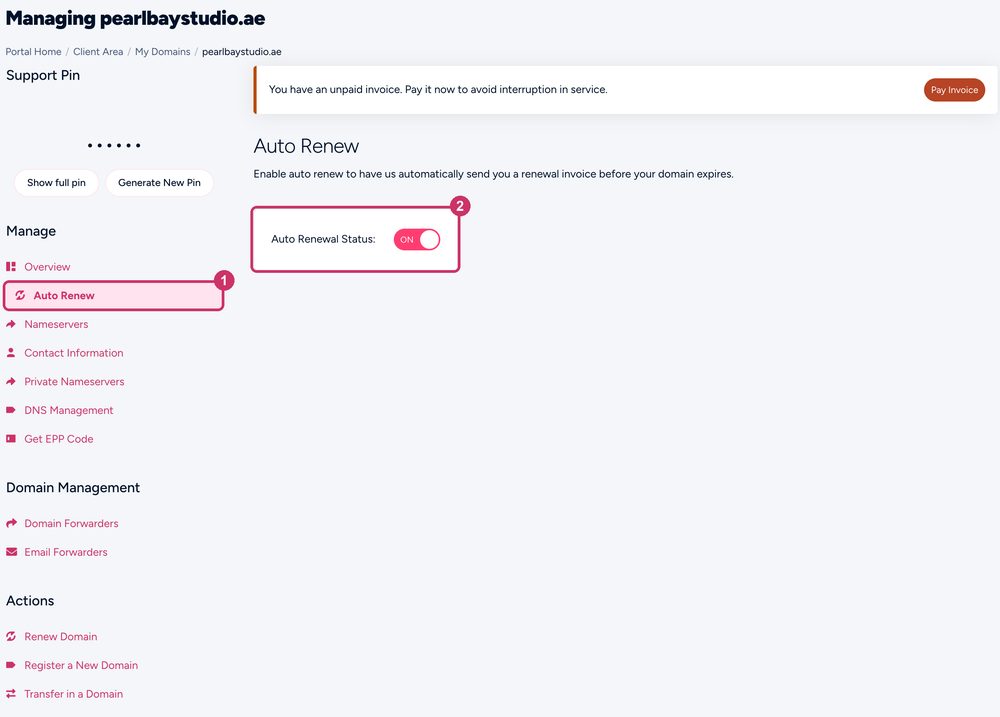
Auto Renew in the left menu, then the switch
What happens when auto-renew is off
- We don’t create a renewal invoice, and we don’t charge your card.
- We still send reminder emails before and after the expiry date, so you can change your mind.
- If you do nothing, the domain expires on its expiry date. See My domain has expired.
Hosting, email, website builder and add-ons
These don’t have a switch. To stop one renewing, request a cancellation for the end of its billing period. See Cancel a service: domains, hosting, email and others.