
Your bank shows the money taken, but your order didn’t go through, your invoice still says Unpaid, or your domain or hosting isn’t active? Don’t worry, and please don’t pay again. Whether you’re an existing customer or new to Tasjeel.ae, we can sort it quickly.
What happened
Your card payment was held by your bank, but it didn’t complete on our side. This can happen if the payment page was closed, timed out or lost connection before the order finished. Your bank shows the amount as taken, but we haven’t received it yet.
A second attempt can be held as well, so you’d see the amount taken twice. Contact us first: we’ll check your payment and tell you exactly what to do.
Which applies to you?
| You already have a Tasjeel.ae account | You’re a new customer | |
|---|---|---|
| You can tell because… | You can log in at my.tasjeel.ae and see an invoice marked Unpaid | You can’t log in, or you got no order confirmation and no invoice by email |
| Usually happens when… | Paying a renewal or a new order from your client area | Ordering for the first time on our website |
| Jump to | Existing customers | New customers |
If you already have an account
- Find the unpaid invoice
Log in at my.tasjeel.ae and go to Billing › My Invoices. Note the invoice number marked Unpaid. Don’t pay it again.
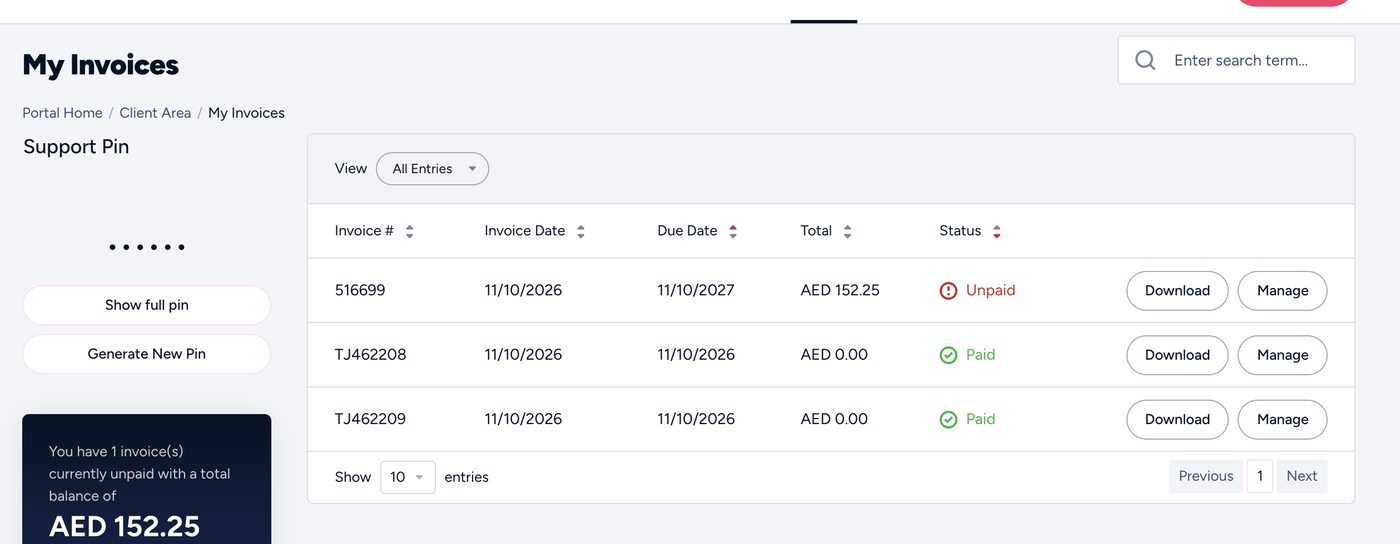
The invoice still shows Unpaid - Contact us by ticket or chat
Ticket: open one from your client area, so we know it’s you. Chat: we’ll ask for your support PIN, shown on the left of your client area.
- Tell us
- The invoice number
- The last 4 digits of the card you paid with
- We complete it
We match your payment, mark the invoice as paid, and your service activates or renews. You don’t need to do anything else.
Say so in your message and we’ll deal with it first, so your website and email don’t stop.
If you’re a new customer
If the order didn’t finish, your account may not have been created, so you won’t have a login, an invoice or a support PIN. That’s fine: you don’t need any of them.
- Chat with us
Start a chat on our website: it’s the quickest, and you don’t need an account. Or email us at [email protected].
- Tell us
- What you were buying, such as the domain name or the hosting or email plan
- The last 4 digits of the card you used
- The email address you used when ordering
- We take it from there
We check your payment and guide you through the next steps to get your service running.
A new order creates a second payment hold on your card. Wait until we’ve checked your payment.
If your payment was cancelled
Some held payments reach us as cancelled rather than waiting to be completed. We’ll tell you if yours is one of them when you contact us.
- We can’t complete a cancelled payment.
- The held amount goes back to your balance. How long that takes depends on your bank.
- We’ll help you pay again for your order, so your service isn’t delayed.
Common questions
How long does it take?
Usually we can sort it while you’re still in the chat or ticket with us. The key is to contact us, so the sooner you do, the sooner your service is running.
What if I’d rather cancel?
Tell us. If we don’t complete the held payment, your bank releases it back to your balance. How long depends on your bank.
The money shows twice on my bank statement.
That’s usually two held attempts. We complete one, and your bank releases the other by itself. Tell us both amounts and dates if you’re unsure.
Is it safe to send my card details?
Only ever send the last 4 digits. Never send your full card number, expiry date or security code, to us or anyone.