
How to cancel a Tasjeel.ae service, and what to do first so you don’t lose your website or email.
Domains
- Turn off auto-renew
Log in to your client area at my.tasjeel.ae. Click Domains › My Domains and switch off the Auto Renew switch next to the domain. See Turn auto-renew on or off.

The Auto Renew switch next to each domain - Let it run out
The domain keeps working until its expiry date, then stops. Nothing more to pay.
Moving the domain to another company instead? See Transfer a domain away from Tasjeel.ae.
Hosting, email, website builder and add-ons
When hosting or email is cancelled, its website files and emails are deleted for good. Download everything you want to keep before you cancel. See Back up and restore your website.
- Open the service
Log in to your client area at my.tasjeel.ae. Click Services › My Services, then Manage next to the service.
- Click Request Cancellation
In the menu on the left, under Actions, click Request Cancellation.
- Fill in the form
Tell us briefly why you’re leaving. If you also want to stop the domain that came with it, tick I confirm I do not want to renew this domain again. Under Cancellation Type, choose End of Billing Period to keep using it until it runs out, or Immediate.
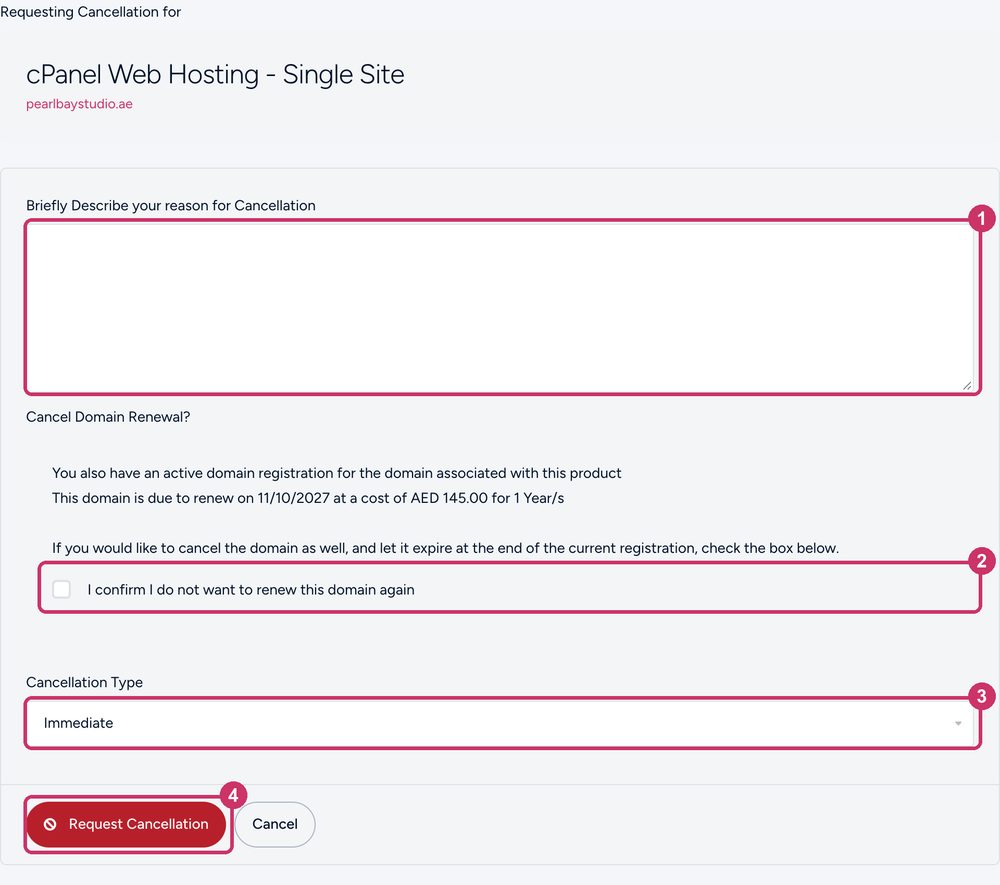
The cancellation form - Send the request
Click Request Cancellation. We confirm by email.
Common questions
Can I cancel by email or ticket instead?
Yes. Reply to the renewal invoice email, or open a ticket, before the renewal date.
It has already renewed. Can I get my money back?
It depends on the service and how soon you ask. See Refunds.
What happens to the domain if I cancel hosting?
Nothing, unless you tick the box to stop its renewal too. Domains and hosting are separate.