
Every Tasjeel.ae invoice shows UAE VAT. Add your company’s VAT number (TRN) to your account so it appears on your invoices, and download any invoice as a PDF.
Add your TRN
- Open Account Details
Log in to your client area at my.tasjeel.ae. Click your name at the top right, then Account Details.
- Type your TRN
Under Billing Address, enter your TRN in VAT Number. Check your company name and address are right too, as they appear on your invoices.
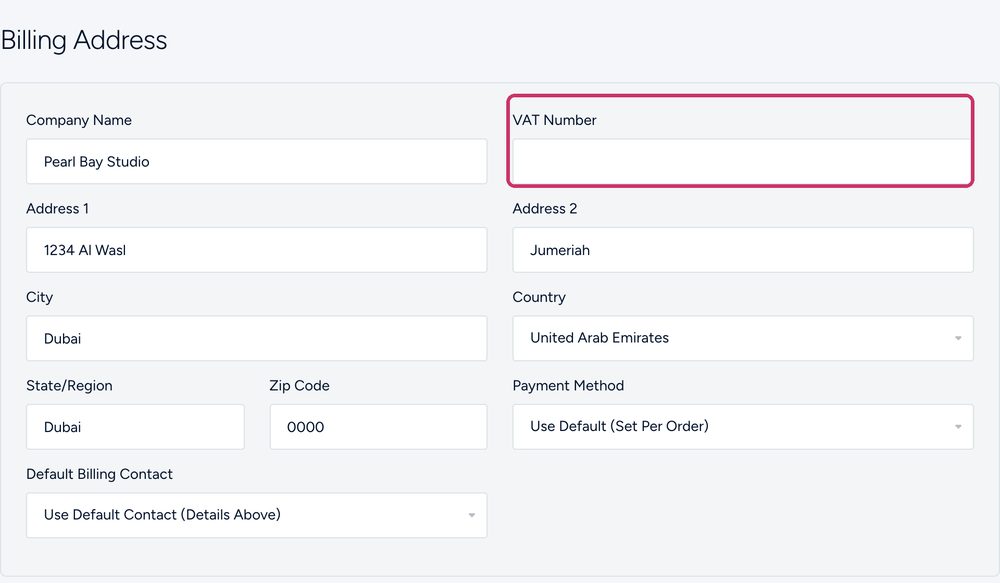
VAT Number under Billing Address - Save
Scroll down and click Save Changes.
Already have invoices without your TRN?
Once you save your TRN, it’s added to all your invoices, including earlier ones. Just download them again.
Download an invoice
- Open the invoice
Go to Billing › My Invoices and click the invoice.
- Download it
Click Download to save it as a PDF.