
SPF, DKIM and DMARC are three DNS records that prove your emails really come from you. Without them, your emails are more likely to land in spam, or be refused by Gmail and Outlook.
What each one does
| Record | In plain words |
|---|---|
| SPF | A list of the servers allowed to send email for your domain. Anything else is suspicious. |
| DKIM | A digital signature on every email you send, so the receiver can tell it wasn’t changed or faked. |
| DMARC | Tells receivers what to do with an email that fails the checks (let it through, send it to spam, or refuse it), and can send you reports. |
Using our email and our nameservers? Check it’s all set
If your email is with Tasjeel.ae and your domain uses our nameservers, SPF and DKIM are set up for you. To check:
- Open Email Deliverability
Log in to cPanel, then go to Email › Email Deliverability.
- Look at the status
Valid means you’re set. If it says there’s a problem, click Manage to see which record is missing.
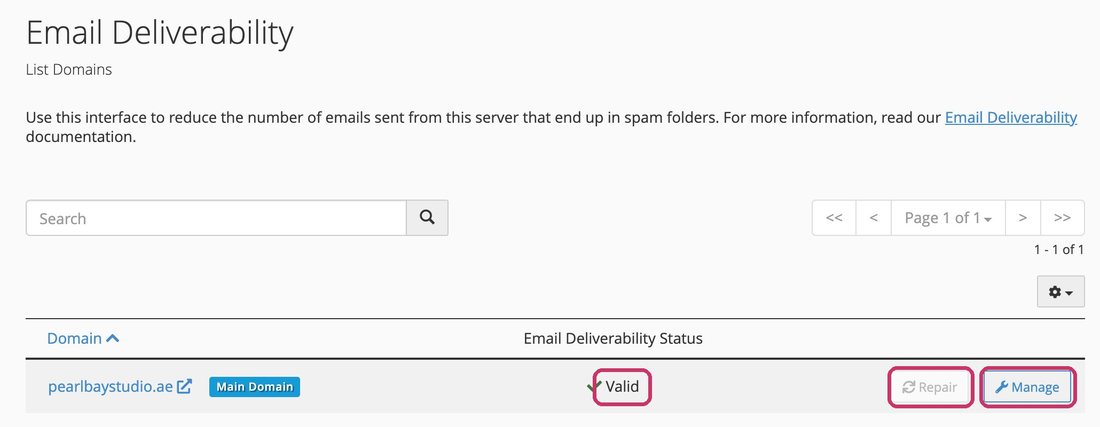
Email Deliverability: Valid, with Repair and Manage - Fix it
If your DNS is with us, click Repair and cPanel adds the right records for you.
DNS somewhere else, such as Cloudflare?
Click Manage in Email Deliverability and copy the suggested SPF and DKIM records exactly into your DNS provider. See Where to edit your DNS.
Using Google Workspace, Microsoft 365 or Zoho?
Then they send your email, so use the SPF and DKIM records they give you. See Use Google Workspace with your domain, Use Microsoft 365 with your domain or Use Zoho Mail with your domain.
A domain can have just one SPF record. If you send from two places, for example our hosting and a newsletter service, combine them into one record. Two SPF records break both.
Adding DMARC
If you don’t have one, add a TXT record named _dmarc with the value v=DMARC1; p=none;. That only watches and doesn’t block anything. Once SPF and DKIM are working, you can make it stricter. See Add or edit DNS records: A, CNAME, MX, TXT.
Our Email Fraud Protection add-on protects your domain from spoofing, phishing and impersonation. It gives you a panel to set up and watch your DMARC, SPF and DKIM. From there you tighten your DMARC step by step: first only watch (none), then send fakes to spam (quarantine), then block them completely (reject). Add it from your hosting plan’s page in the client area under Addons and Extras, or contact us and we’ll help.