
When your hosting is set up, we send you an email called “Web Hosting Account Information”. It holds the details you’ll need to log in, set up email and point your domain. Here’s what each part means.
Can’t find it?
Search your inbox and spam folder for “Web Hosting Account Information”. It goes to the email address on your Tasjeel.ae account. Still missing? Ask us and we’ll resend it.
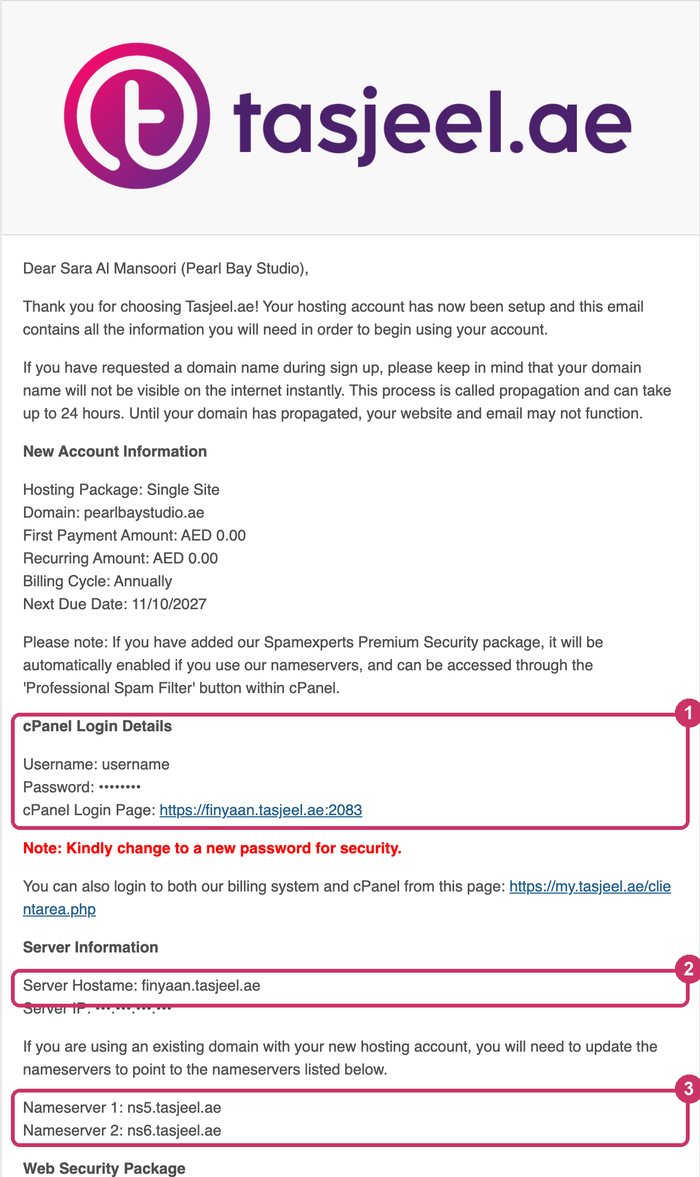
What each part is for
| In the email | What it is | You need it to |
|---|---|---|
| New Account Information | Your plan, domain, price and next renewal date | Check what you bought |
| 1. cPanel Login Details | Your cPanel username, first password and login page | Log in to cPanel directly. Easier: one click from the client area. See Log in to cPanel and find your username |
| 2. Server Hostname | The name of the server your hosting is on, such as finyaan.tasjeel.ae |
Set up email on phones and computers when mail.yourdomain.ae doesn’t work. See Email settings: server names and ports |
| 3. Nameservers | The nameservers for your hosting, such as ns5.tasjeel.ae and ns6.tasjeel.ae |
Point your domain to your hosting, if it isn’t already. See Our nameservers, and how to change yours |
| Uploading Your Website | FTP uses the same cPanel login. WordPress installs from cPanel | Put your website online. See Upload your website (File Manager or FTP) |
| Email Settings | The server name for your mailboxes | Set up email. The email shows POP3; we recommend IMAP with the same server name. See Email settings: server names and ports |
Change the first password.
The cPanel password in the email is a starting password. Change it once you’ve logged in. See Change or reset your cPanel password.
Things you can ignore
- Server IP. You don’t need it. Use the server name and nameservers instead.
- Web Security and SpamExperts paragraphs. They only apply if you bought those add-ons.
Keep it safe
Keep the email, or save the details in a password manager. You can always see your nameservers and log in to cPanel from the client area, so you won’t be stuck if you lose it.