
Using Outlook and Microsoft 365 with your own domain? Here are the records to add, where to add them, and the one setting that catches people out on our hosting.
Where to add the records
Add them where your domain’s DNS lives: the client area’s DNS Management if you’re on ns3 and ns4, cPanel’s Zone Editor if you’re on our hosting nameservers, or your DNS provider (such as Cloudflare). Not sure? See Where to edit your DNS.
The records Microsoft needs
Microsoft’s setup shows the exact values for your domain. Copy them exactly. They usually look like this:
| Record | What to add | Why |
|---|---|---|
| Verification | A TXT record starting MS= |
Proves the domain is yours |
| MX | One record ending .mail.protection.outlook.com, priority 0 |
Sends your email to Microsoft |
| SPF | One TXT record: v=spf1 include:spf.protection.outlook.com -all |
Lets Microsoft send for your domain |
| Autodiscover | A CNAME at autodiscover pointing to autodiscover.outlook.com |
Lets Outlook set itself up |
| DKIM | Two CNAME records at selector1._domainkey and selector2._domainkey, from Microsoft |
Signs your emails so they’re trusted |
- Remove the old MX records
Delete every MX record that isn’t Microsoft’s, including ours. Old ones send some of your email to the wrong place.
- Keep only one SPF record
If you already have a record starting
v=spf1, edit it to include Microsoft rather than adding a second one. Two SPF records break both. - Turn on DKIM in Microsoft
After adding the two CNAME records, turn on DKIM for your domain in the Microsoft Defender portal.
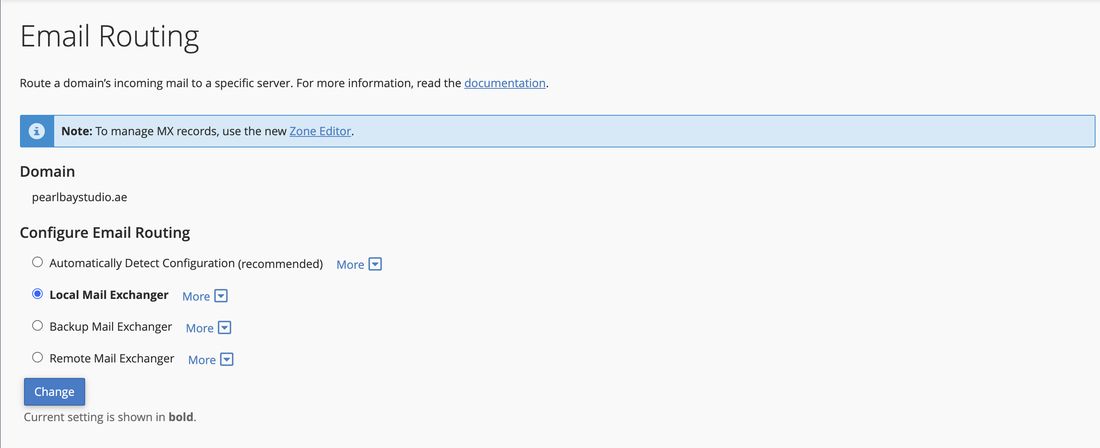
If your website is hosted with us, log in to cPanel, go to Email › Email Routing and choose Remote Mail Exchanger. Otherwise, emails sent from your own website (such as contact forms) stay on our server and never reach Outlook.
We’re happy to. Copy the records from your Microsoft setup and send them to us by chat or ticket, and we’ll add them for you.
Once the MX record points to Microsoft, new email stops arriving in your mailboxes with us. Move any email you want to keep first, then switch.