
A free Cloudflare account works well with Tasjeel.ae hosting and email. Here’s what it gives you, and how to switch without your website or email going down.
What a free Cloudflare account gives you
- Fast, reliable DNS you manage in one place.
- A faster website, by keeping copies of your pages and images closer to your visitors.
- Protection against attacks and bad bots.
- Free SSL between your visitors and Cloudflare.
- Simple visitor statistics.
Before you switch: collect your records from us
When your nameservers move to Cloudflare, it takes over all your DNS. Cloudflare copies your records automatically when you add your site, but always check these are there:
| You have with us | Records Cloudflare must have |
|---|---|
| Hosting | The A record for your domain and www, plus all the email records below |
| Email only | MX, the mail record, SPF (TXT starting v=spf1), DKIM (TXT at default._domainkey) and any DMARC record |
Find your records in cPanel’s Zone Editor (hosting nameservers) or the client area’s DNS Management (ns3 and ns4).
Switch to Cloudflare
- Add your site to Cloudflare
Create a free Cloudflare account, add your domain and choose the Free plan. Cloudflare scans and copies your current records.
- Check every record against the table above
Add anything missing before you go any further.
- Set email records to “DNS only”
In Cloudflare, every email-related record (the
mailrecord and anything your MX points to) must show the grey cloud, “DNS only”. If it’s orange, email stops. - Change your nameservers with us
Cloudflare gives you two nameservers. In our client area, go to Domains › My Domains, open the domain, choose Nameservers, then Use custom nameservers, enter them and save.
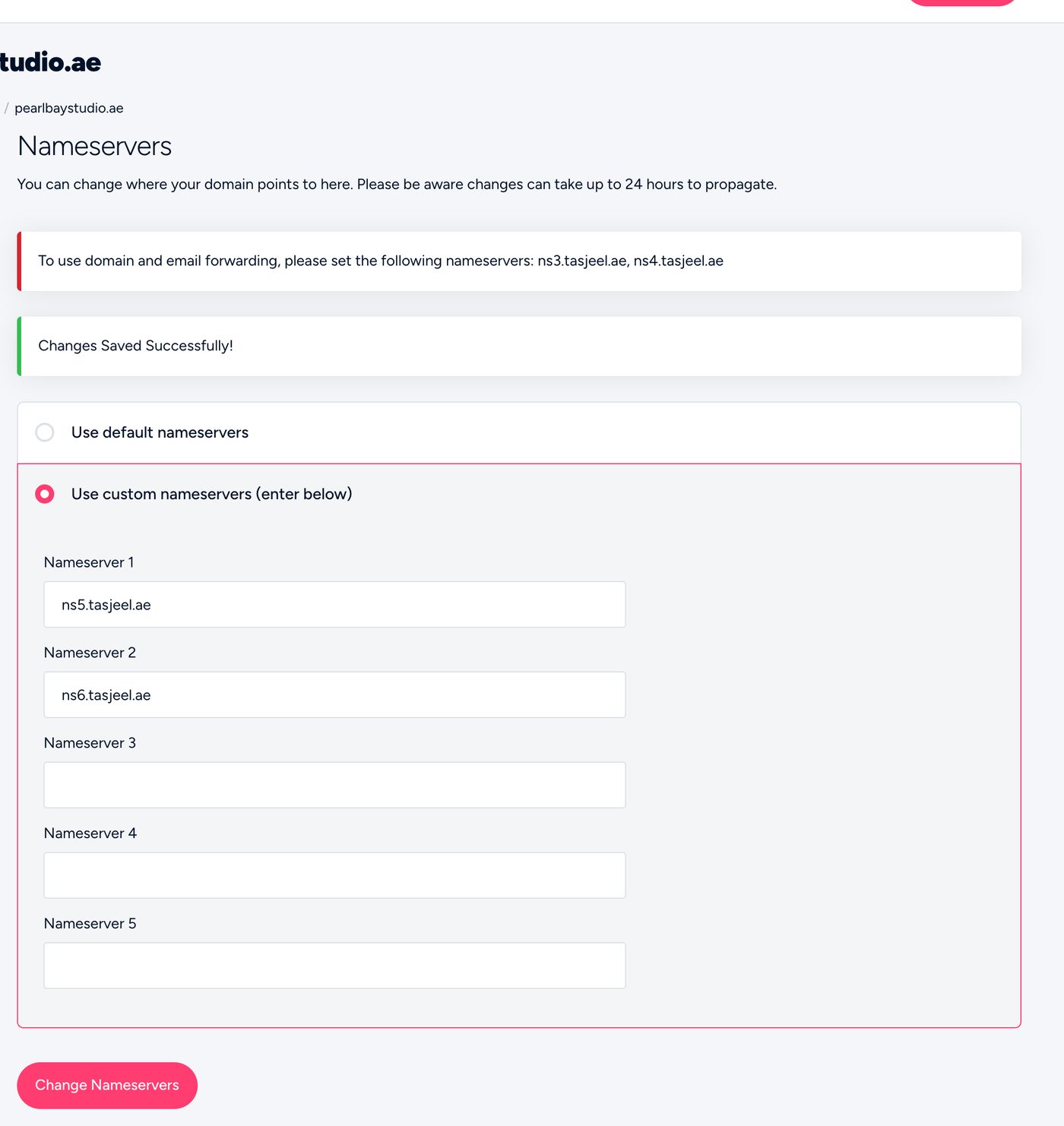
Entering Cloudflare’s nameservers in the client area - Set SSL to Full (strict)
In Cloudflare, under SSL/TLS, choose Full (strict). Your hosting with us already has a valid certificate, and anything else can cause a redirect loop.
That’s almost always the SSL setting. Change it to Full (strict) in Cloudflare.
Common questions
Do I still manage DNS with Tasjeel.ae?
No. Once you switch, add and change records in Cloudflare. Changes in our client area or cPanel won’t apply.
My email stopped after switching.
Check the email records exist in Cloudflare and are set to “DNS only” (grey cloud).
Can I go back?
Yes. Change your nameservers back to ours in the client area. Make sure any records you added in Cloudflare exist with us first.