
Every hosting plan comes with free SSL, so your site opens with https and a padlock. It installs and renews by itself, but only when your domain points to your Tasjeel.ae hosting.
Check your SSL status
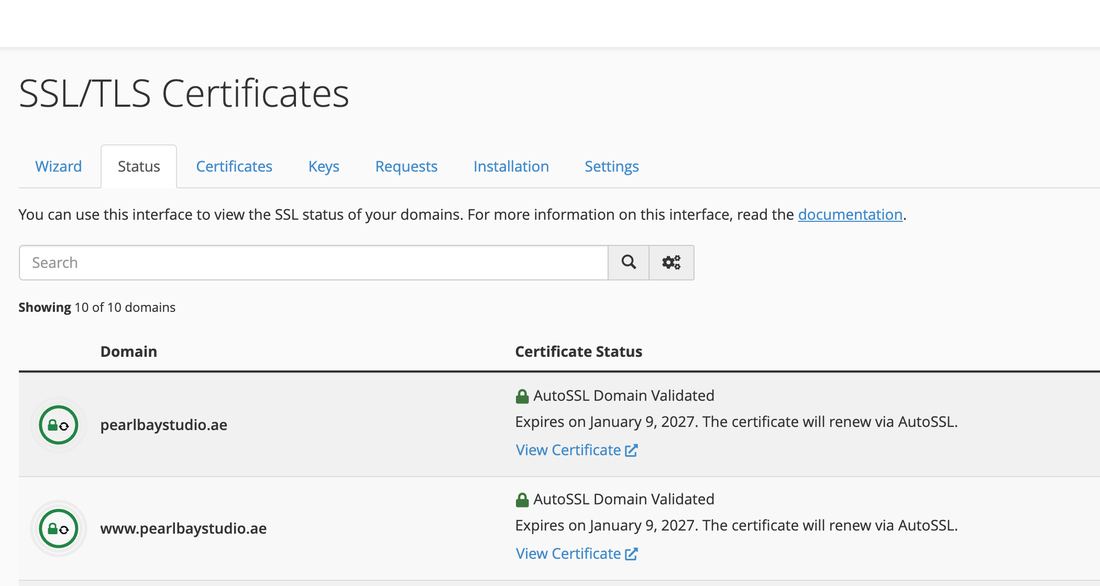
Log in to cPanel, then go to Security › SSL/TLS Status. Each address on your hosting is listed with its status. AutoSSL Domain Validated means it’s working, with the date it renews.
The usual reasons it fails
- Your domain doesn’t point to your hosting yet
Free SSL can only be issued once your domain points here. Check your nameservers or DNS records. See Our nameservers, and how to change yours.
- A certificate was added by hand
If you, or your developer, installed a certificate yourself (for example a free one from another site, or an old paid one), free SSL won’t replace it while it’s still valid. When that certificate runs out, your site shows a security warning.
The fix: remove the certificate you added. In cPanel, go to Security › SSL/TLS, open the Installation tab, find your domain and click Uninstall. Free SSL then puts its own certificate in place at its next automatic check. Want it straight away? Contact us after uninstalling and we’ll run it for you.
- You changed your DNS recently
Give it a few hours. SSL is issued automatically once the change has spread.
- Your domain is behind Cloudflare
When Cloudflare’s proxy (the orange cloud) is on, our server can’t check your domain. Visitors still see Cloudflare’s own certificate, so your site stays secure. See Move your DNS to Cloudflare without breaking your website or email.
- One address isn’t pointing here
If
wwwormailpoints somewhere else, that address can’t get a certificate, even if the main domain can.
Tell us the domain and we’ll check it and run the SSL for you.